If you have ever typed “displayport 2.1 vs 1.4” into Google, you are not alone. It is one of the most searched questions in the PC display world right now — and for good reason. A DP 2.1 cable promises up to 80 Gbps of bandwidth, 8K at 120Hzy 4K at 240Hz sin compresión. Meanwhile, the trusty DisplayPort 1.4 standard has powered every serious gaming setup for the past decade at a fraction of the price.
So which one do you actually need? Can a DisplayPort 1.4 cable still drive your 4K 144Hz monitor? And is a DP 2.1 cable worth the upgrade money if your GPU only has DP 1.4 ports? This guide compares DisplayPort 1.4 vs 2.1 spec by spec, explains UHBR20 and the DP80 certification, and gives you a simple buying checklist — no marketing fluff.
DisplayPort 2.1 vs 1.4 at a Glance
| Característica | DisplayPort 1.4 | DisplayPort 2.1 |
|---|---|---|
| Ancho de banda máximo | 32.4 Gbps (HBR3) | Up to 80 Gbps (UHBR20) |
| Effective data rate | 25.92 Gbps | 77,37 Gbps |
| 4K support | 144Hz (with DSC) | 240Hz (uncompressed) |
| 8K support | 60Hz (with DSC) | 120Hz (uncompressed) |
| Cable certification | DP8K | DP40 / DP54 / DP80 |
| Backward compatible | DP 1.1–1.3 | DP 1.2, 1.4 and older |
| Lo mejor para | 1440p 240Hz, 4K 144Hz, 8K 60Hz | 4K 240Hz, 8K 120Hz, multi-display, future-proofing |
Bandwidth and Encoding: Where DP 2.1 Pulls Ahead
The headline difference between DisplayPort 1.4 and 2.1 is raw bandwidth. DisplayPort 1.4 tops out at 32,4 Gbps using HBR3 with 8b/10b encoding — which wastes about 20% of the link. After overhead, you get only 25.92 Gbps of real data.
DisplayPort 2.1 introduces the UHBR family — UHBR10, UHBR13.5 and UHBR20 — with a far more efficient 128b/132b encoding scheme (about 3% overhead). The fastest tier, UHBR20, delivers 80 Gbps of total bandwidth and 77,37 Gbps of usable data — roughly three times the effective throughput of a DP 1.4 cable.
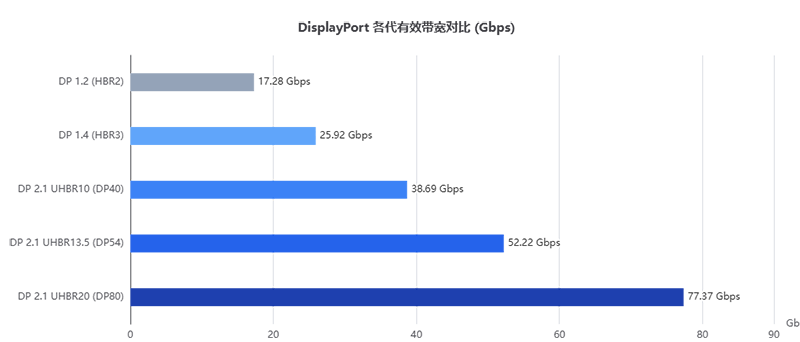
DisplayPort 1.4 vs 2.1: Full Spec Comparison
| Especificación | DisplayPort 1.4 | DisplayPort 2.1 |
|---|---|---|
| Introduced | 2016 | 2022 (2.1a 2024, 2.1b 2025) |
| Max bandwidth | 32,4 Gbps | 80 Gbps (UHBR20) |
| Effective data rate | 25.92 Gbps | 77,37 Gbps |
| Encoding | 8b/10b (20% overhead) | 128b/132b (~3% overhead) |
| Link rates | HBR3 (8.1 Gbps/lane) | UHBR10 / 13.5 / 20 (10–20 Gbps/lane) |
| 4K refresh (uncompressed) | Up to 120Hz (144Hz with DSC) | Up to 240Hz |
| 8K refresh | 60Hz (with DSC) | 120Hz (uncompressed), 240Hz with DSC |
| DSC | DSC 1.2 | DSC 1.2a |
| HDR | HDR10 | HDR10, dynamic HDR |
| Adaptive sync | G-Sync, FreeSync | G-Sync, FreeSync, VESA AdaptiveSync |
| MST daisy-chain | Soporte | Supported, default in DP 2.x |
| Panel Replay (power saving) | No | Yes (optional) |
| Backward compatibility | DP 1.1–1.3 | DP 1.2, 1.4 and older |
What Can a DisplayPort 1.4 Cable Actually Do?
Plenty. A certified VESA DP8K cable (the DP 1.4 8K certification) comfortably handles:
- 1440p at 240Hz — the current mainstream esports sweet spot
- 4K a 120 Hz natively, or 4K at 144Hz with DSC
- 8K a 60 Hz using Display Stream Compression
- 1080p at 360Hz for the fastest competitive panels
- G-Sync and FreeSync, HDR10, and multi-monitor MST daisy-chaining
For most gamers — even serious ones on 4K 144Hz or 1440p 240Hz monitors — a good DisplayPort 1.4 cable is genuinely all you need. This is why the answer to “DP 2.1 vs 1.4, which should I buy?” is so often: a certified DP 1.4 cable, unless you know your hardware needs more.
What Does DisplayPort 2.1 Add? UHBR Tiers Explained
DP 2.1 cables are certified in three performance tiers. Don’t assume every DP 2.1 cable is 80 Gbps — the tier printed on the box matters more than the “2.1” label.
| Certificación | UHBR tier | Ancho de banda | What it enables |
|---|---|---|---|
| DP40 | UHBR10 | 40 Gbps | 4K 144Hz, 8K 30Hz; comparable to DP 1.4 in practice |
| DP54 | UHBR13.5 | 54 Gbps | 4K 240Hz, 8K 60Hz uncompressed |
| DP80 | UHBR20 | 80 Gbps | 4K 240Hz, 8K 120Hz, 16K 60Hz with DSC |
Buying Guide: How to Choose the Right DisplayPort Cable
- Check the certification, not the marketing label. Look up the cable in the official VESA certified-products database. “8K” printed on a box means nothing without the DP8K (DP 1.4) or DP40/DP54/DP80 (DP 2.1) certification.
- Respect cable length limits. For 4K 120Hz+ over copper, stay at or under 2 meters; UHBR20 passive cables are typically limited to ~1.2m. For longer runs, use an active or fiber-optic DisplayPort cable (up to 50–100m).
- Don’t overpay. A VESA-certified DP 1.4 cable covers the majority of gamers. Buy DP 2.1 only when your GPU, monitor and use case need UHBR bandwidth — or when future-proofing a new build.
- Build quality still matters. Braided jackets, gold-plated connectors and proper shielding improve durability and EMI resistance, but certification is the non-negotiable baseline.
Preguntas frecuentes
Is DisplayPort 2.1 worth it in 2026? Only if your GPU and monitor both support DP 2.1 and you need 4K 240Hz, 8K 120Hz, or a high-bandwidth multi-monitor setup. Otherwise a certified DP 1.4 cable delivers identical performance for less money.
Can I use a DP 2.1 cable with a DP 1.4 GPU? Yes. DisplayPort 2.1 is fully backward compatible, and the link simply negotiates down to DP 1.4 (HBR3) speeds. You get no extra bandwidth, but everything still works.
Does DisplayPort 2.1 support 8K? Yes — 8K at 120Hz uncompressed with UHBR20, and up to 8K at 240Hz with DSC. DP 1.4 reaches 8K 60Hz with DSC.
Is a DP 2.1 cable needed for 4K 240Hz? Yes. 4K 240Hz exceeds DP 1.4’s bandwidth, so you need a DP 2.1 connection — ideally a certified DP80 (UHBR20) cable.
Are all DisplayPort 2.1 cables 80 Gbps? No. DP 2.1 cables come in three certified tiers — DP40 (40 Gbps), DP54 (54 Gbps) and DP80 (80 Gbps). Check the printed certification, not just the version number.
Does a better DisplayPort cable improve picture quality? No — digital signals are bit-for-bit identical on any cable that meets the required spec. A bad cable causes black screens, flicker and dropped refresh rates; a certified one just works.