What a magnetic USB-C cable actually is
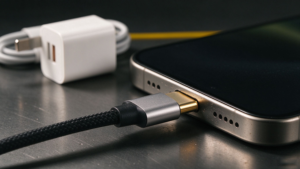
Every USB-C receptacle has 24 contacts. A standard cable ends in a fixed male plug that carries a subset of those contacts down its own wires. A magnetic design splits that plug in two: a small male head stays in the device, and the cable ends in a female socket held to the head by magnets. Bring the cable close and it snaps on; pull away and it separates cleanly instead of levering the plug out of the port.
The point of the design is not a faster connection. It is fewer mating cycles on the device’s own connector. People who charge a phone on a bedside stand, in a car mount, or on a desk plug and unplug several times a day; the port contacts loosen over those cycles. With a magnetic head left in place, the repeated action happens at the cable-side seam, which is cheaper to replace than the phone’s port.
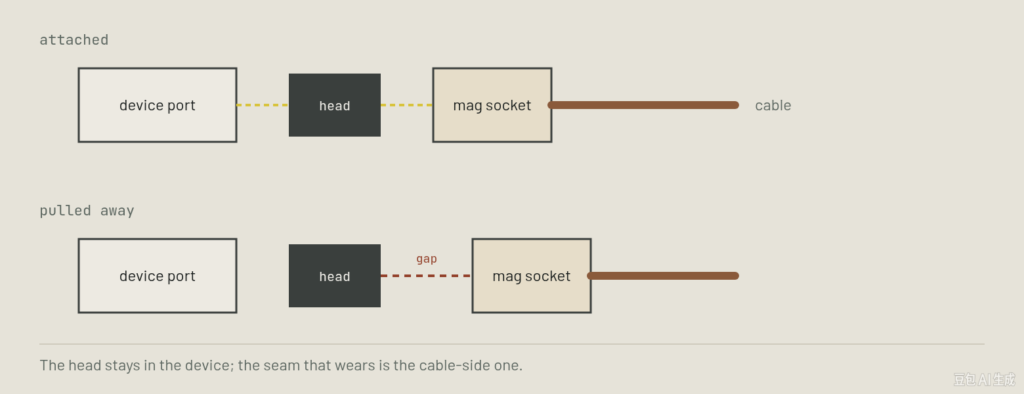
That second seam is the whole engineering story. A fixed plug has one contact interface: plug to receptacle. A magnetic cable has two: head to receptacle, and head to magnetic socket. Every additional contact interface adds a place where dust, oxidation and contact resistance can show up, so the design trades one port’s wear for a seam you can inspect and replace.
The pin-count split: 5-pin versus 24-pin
| Característica | 5-pin magnetic head | 24-pin magnetic head |
|---|---|---|
| Potencia | Charge and ground plus configuration channel; typically up to 3 A unless marked otherwise. | Full power path; 5 A and E-marker required for 100 W / 240 W EPR. |
| Data | USB 2.0 only, 480 Mbps. No SuperSpeed pairs across the seam. | Can carry USB 3 / 10 Gbps when the listing states it; verify the rated speed. |
| Video Alt Mode | No DisplayPort or HDMI Alt Mode through the magnetic seam. | Possible, but only on a 24-pin design that lists video support. |
| Typical device | Phones, earbuds, tablets, bedside and in-car charging. | Laptops, external drives, docks and anything moving large files. |
| Where it falls short | Looks like a USB-C cable but cannot do SuperSpeed or video, whatever the box implies. | More contacts to keep clean; the seam has to bridge every pair cleanly. |
Where a magnetic cable wears first
The contact faces matter most. A magnetic connection sits on flat pads rather than the sprung pins of a normal plug, so its hold depends on surface finish and magnet alignment. Brushed or oxidized pads pass power unevenly — a symptom that looks like a weak charger or a flaky cable, not a dirty seam. Keeping the two faces wiped down is the single piece of maintenance a magnetic design asks for.
The strain relief is the same failure mode as any other cable. Every flex happens where the cable exits its housing; a right-angle or reinforced boot there extends the life more than braiding alone. And the retained head is the mixed blessing: it protects the port from dust, but if the pull force is too weak, the head can detach in the pocket or stay behind when you meant to move it to another device.
What to check on the spec sheet
| Requirement | Why it matters | What to check, what to avoid |
|---|---|---|
| Pinout match5-pin or 24-pin | Decides whether the seam can carry SuperSpeed and Alt Mode at all. | Match it to the scenario above. Avoid listings that never name the pinout. |
| Data speed stated480 Mbps or 10 Gbps | Pin count alone does not guarantee the wired speed. | Look for the rated rate in words. Avoid “high-speed” with no number. |
| Current and E-marker3 A, 5 A, EPR | Above 3 A the cable must negotiate its own rating; 5 A needs E-marker. | For a laptop, confirm 5 A and E-marker rather than a bare wattage claim. |
| Contact finishplating on the seam pads | Decides how quickly the faces tarnish and how clean the contact stays. | Ask what plating the head and socket use; pad material belongs on the datasheet. |
| Pull-away forceseam vs retained head | Strong enough to stay on in use, weak enough to release under a real tug. | Check replacement heads are sold separately; a lost head should not mean a new cable. |
| Jacket and gaugeTPE / braid, conductor size | Survives flex cycles and keeps voltage drop low at the rated current. | On a high-current run, confirm the gauge instead of assuming a thick jacket means thick conductors. |
Questions we get from buyers
- Are magnetic USB-C cables faster than regular ones?
- No. The magnetic seam changes how the cable attaches, not the protocol. A 5-pin magnetic cable tops out at USB 2.0; only a 24-pin design rated for it can reach 10 Gbps, and even then a direct cable usually holds the link more cleanly.
- Will a magnetic cable charge my laptop at 100 W or 240 W?
- Only if the listing states 5 A and an E-marker chip at that rating. Most magnetic cables are built around phone charging currents. A 3 A seam cannot reach 100 W or 240 W EPR regardless of the magnetic connection.
- Do the magnetic heads fall off or get lost?
- The head sits in the device and the cable snaps to it. A weak pull force can let the head detach, which is why removable replacement heads matter; keep a spare in the drawer if you move between devices often.
- Can I transfer photos and video over a magnetic cable?
- Photos and small files over USB 2.0 are fine on a 5-pin design. Raw video, large archives or an external SSD need a 24-pin cable that explicitly lists USB 3 speed; check the transfer speed on your own drive before trusting it for work.
- Are magnetic cables bad for the port?
- The opposite is the main benefit: the device port is mated once and left with the head in place, so the repeated plugging that loosens contacts happens at the cable seam. The caveat is the extra contact interface at that seam, which needs occasional cleaning.