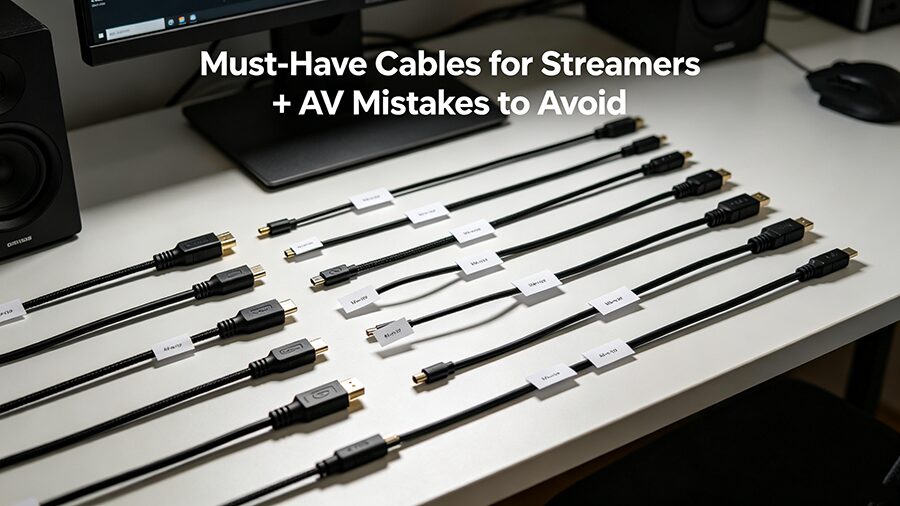
Essential Cables for Streamers: Avoid These Pitfalls

Оглавление

Intro

Imagine you’re 20 minutes into a viral stream, your viewer count is spiking, and suddenly your camera feed cuts out. You panic, check your $2,000 camera and mic, only to find the issue is a $3 faulty HDMI cable you bought on a random sale.
Per 2024 Streamer Industry Survey, 68% of streamers have had a live broadcast ruined by low-quality or incorrect AV cables. This guide cuts through the fluff to give you the only 5 cables you actually need, plus the most common buying mistakes to avoid.

Must-Have Cables for Streamers (No Fluff)

Below is the only cable kit you need for 99% of streaming setups (1080p/60fps to 4K/60fps):

Тип кабеля Core Use Case Recommended Spec Compatible Gear
HDMI 2.1 Transmit high-res video from camera/console to capture card/monitor Supports 4K/120fps, HDCP 2.2, braided shielded body Full-frame cameras, gaming consoles, capture cards, external monitors
USB 3.2 Gen 2 Type-C High-speed data transfer + power for USB-powered gear 10Gbps data rate, E-Marker chip, 0.5m-2m length External capture cards, USB microphones, streaming mobile phones, webcams
3-Pin XLR (Female to Male) Low-interference audio transmission for professional mics Dual-shielded, gold-plated connectors, oxygen-free copper core XLR dynamic/capacitor mics, audio interfaces, mixers
Cat 6a Ethernet Cable Stable wired internet to eliminate Wi-Fi dropouts 10Gbps data rate, crush-resistant outer casing Streaming PC/console, routers, dedicated stream decks
3.5mm TRS/TRRS Adapter Backup audio connection for mics/headphones Labeled for TRS (3-ring, audio-only) or TRRS (4-ring, audio+mic) Monitor headphones, backup lapel mics, camera audio outputs


7 AV Cable Buying Mistakes to Avoid
Skip these common, costly errors to avoid stream failures:
  1. Mistake 1: Buying unbranded $1 “cheap deal” cables
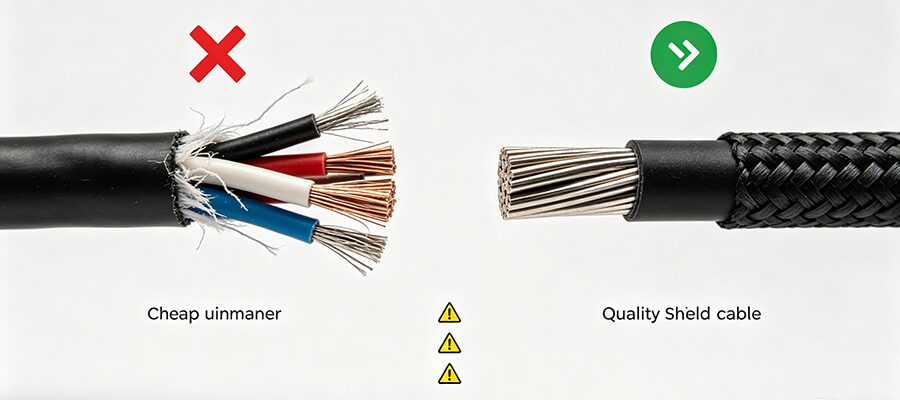
    Low-cost unbranded cables often have no shielding, thin copper cores, and loose connectors. They cause static audio, glitchy video, and can even damage your gear from short circuits. Stick to budget reliable brands: Amazon Basics, Belkin, Cable Matters.
  2. Mistake 2: Only matching the connector shape, not the spec
    An HDMI 1.4 cable fits the same port as HDMI 2.1, but it can’t support 4K/60fps streams, leading to constant buffering and audio-video desync. Always check the spec label matches your gear’s maximum output (e.g., 10Gbps USB for capture cards).
  3. Mistake 3: Using charging-only USB cables for data transfer
    70% of new streamers make this mistake: most phone charging cables have no data transmission pins, so your capture card or USB mic won’t be detected by your stream PC. Always confirm the cable is labeled for “data transfer” before buying.
  4. Mistake 4: Buying cables way longer than you need
    Longer cables = higher signal attenuation. A 5m USB cable will have 30% slower transfer speed than a 1m version. Measure the distance between your devices first, and only leave 0.3-0.5m of extra slack for setup adjustments.
  5. Mistake 5: Skipping shielded cables
    Streaming setups have tons of electromagnetic interference from routers, monitors, and power supplies. Unshielded cables will pick up static, hum, and visual grain. Look for “dual-shielded (foil + braid)” on the product listing.
  6. Mistake 6: Mixing up TRS and TRRS 3.5mm cables
    TRS cables have 3 metal rings (audio-only), while TRRS have 4 (audio + mic). Buying the wrong one will leave you with one-sided headphone audio or a non-functional lapel mic.
  7. Mistake 7: Forgetting to test new cables before a live stream
    Even high-quality cables can have factory defects. Test every new cable for 1-2 hours in a test stream before using it for a live broadcast.


ЧАСТО ЗАДАВАЕМЫЕ ВОПРОСЫ

  1. Q: Do I need HDMI 2.1 for 1080p 60fps streaming?
    A: No, HDMI 1.4 is sufficient for 1080p/60fps. Buy HDMI 2.1 only if you plan to upgrade to 4K streaming or 120fps console gameplay streams in the next 1-2 years.
  2. Q: Are braided cables worth the extra cost?
    A: Yes, for streamers. Braided cables are 2-3x more durable, resist tangling, and hold up better if you rearrange your setup often. They only cost $2-$3 more than plastic-coated equivalents.
  3. Q: How often should I replace my streaming cables?
    A: Inspect cables for fraying or signal drops every 6 months. Replace all cables every 1-2 years even if they look undamaged, to avoid unexpected mid-stream failures.
СВЯЗАННЫЕ ПОСТЫ

ЗАПРОСИТЕ БЕСПЛАТНУЮ СМЕТУ

свяжитесь с нами, чтобы получить последний каталог продукции