blog

Mini HDMI vs Micro HDMI

Mini HDMI frente a Micro HDMI: comparación rápida

En el mundo de las conexiones multimedia de alta definición, HDMI es desde hace tiempo el estándar para transmitir señales de audio y vídeo. A medida que la tecnología ha avanzado y los dispositivos se han hecho más compactos, han aparecido versiones más pequeñas del conector HDMI. Dos de estas variantes son Mini HDMI y Micro HDMI. Veamos con más detalle las diferencias entre ellos. El tamaño importa La diferencia más obvia entre Mini HDMI y Micro HDMI radica en su tamaño. Mini HDMI: También conocido como HDMI Tipo C, tiene un tamaño de conector de 10,42 mm × 2,42 mm. Es aproximadamente 60% más pequeño que el conector HDMI estándar (Tipo

Leer más >>
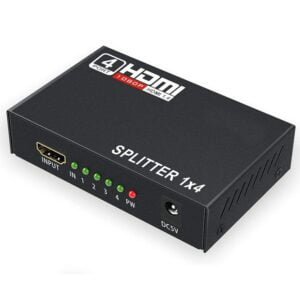
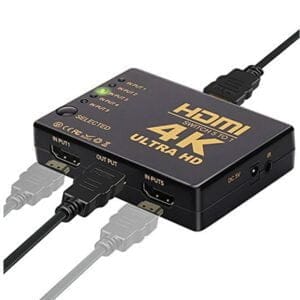
HDMI Splitter vs Switch

HDMI Splitter vs Switch: Diferencias clave y cuándo usar

En el mundo del entretenimiento doméstico y las configuraciones digitales, los dispositivos HDMI desempeñan un papel crucial. Entre ellos, los divisores HDMI y los conmutadores HDMI son dos herramientas de uso común, pero tienen finalidades distintas. Exploremos las diferencias y cuándo utilizar cada uno. Función y configuración de puertos Divisor HDMI El divisor HDMI toma una única señal de entrada HDMI de una fuente como un reproductor Blu-ray, una consola de juegos o un dispositivo de streaming. A continuación, duplica esta señal y la envía a varios puertos de salida HDMI. Por ejemplo, un divisor HDMI 1×4 tiene 1 puerto de entrada y 4 puertos de salida, lo que le permite mostrar el mismo

Leer más >>
USB C Cables Advantages

Cable USB C: Problemas comunes y soluciones

Los cables USB C son muy prácticos, pero también pueden dar problemas. Aquí hay algunos problemas comunes y formas efectivas de solucionarlos. 1. Fallos de conexión A menudo, los dispositivos pueden no reconocer la conexión a través de un cable USB C. Esto puede deberse a una conexión floja, puertos dañados o problemas con los controladores. Esto puede deberse a una conexión floja, puertos dañados o problemas con los controladores. Solución: Comprueba si el cable está firmemente enchufado en ambos dispositivos. Examina los puertos USB C en busca de residuos o daños físicos. Actualiza los controladores de tu dispositivo a la última versión. 2. Puede que notes que tu dispositivo se carga lentamente o no se carga en absoluto con un cable USB C.

Leer más >>
HDMI To Type c

Cables USB C a HDMI: Un Desglose Completo

En el mundo tecnológico actual, los cables USB C a HDMI son esenciales para conectar dispositivos. Sirven de puente entre aparatos modernos equipados con USB C, como portátiles y smartphones, y pantallas HDMI, lo que permite compartir vídeo y audio sin interrupciones. Cómo funciona Estos cables utilizan el modo alternativo DisplayPort (DP Alt Mode) para convertir las señales de los puertos USB C en un formato compatible con HDMI. El puerto USB C envía señales de vídeo y audio, que el cable traduce para que la pantalla HDMI las entienda. Tipos de cables Tipo de cable Resolución Compatibilidad Característica clave Estándar Hasta 4K (30 Hz - 60 Hz) Conectividad básica para tareas cotidianas

Leer más >>
USB-C vs Thunderbolt

USB-C vs Thunderbolt: Una guía clara sobre los puertos

Introduction: Why Understanding These Ports Matters In today’s tech-driven world, USB-C and Thunderbolt ports are everywhere—on laptops, smartphones, monitors, and chargers. While they look identical, their capabilities vary wildly. Choosing the wrong port can lead to sluggish data transfers, inefficient charging, or even device incompatibility! 🔑 Key Insight: USB-C is a physical port shape, while Thunderbolt is a high-speed data protocol (both use the same port).   USB-C: The Universal Connector What Is USB-C? Physical Design: Reversible oval-shaped port (no more “wrong side up” frustration!). Versatility: Supports data transfer, charging (up to 240W), and video output (e.g., 4K/60Hz). Speed Variations: Ranges from USB 2.0 (480 Mbps)

Leer más >>
Cables

Por qué los cables baratos arruinan las transmisiones 4K y los juegos en la nube

Introduction In an era where 4K streaming and cloud gaming demand flawless connectivity, many users unknowingly sabotage their experiences with bargain-bin Ethernet cables. While cheap LAN wires might save $10 upfront, they often cost far more in degraded performance, security risks, and hardware wear. This article exposes the hidden pitfalls of subpar cabling through lab-tested data, real-world case studies, and actionable solutions. Why Cheap Cables Fail Modern Networks Technical BreakdownMost budget cables (e.g., non-certified Cat5e or Cat6) cut corners in ways that cripple high-bandwidth applications: Inadequate Shielding: Cheap PVC jackets offer minimal EMI protection, causing packet loss during 4K video streaming. Copper Purity: Substandard copper-clad

Leer más >>
CAT8 vs. Fiber Optics

CAT8 frente a fibra óptica: La batalla de los centros de datos de corto alcance

Introduction As data centers evolve to support AI-driven workloads, quantum computing, and hyperscale cloud services, the debate over network infrastructure intensifies. A key question arises: Can CAT8 Ethernet cables replace fiber optics in short-range data center deployments? While fiber optics have long dominated high-speed data transmission, CAT8’s advancements challenge this hierarchy. This article explores technical capabilities, cost implications, and future viability through data-driven analysis. CAT8 Cables: The Next-Gen Copper Solution Technical SpecificationsCAT8 cables, standardized by IEEE in 2021, are designed for 25Gbps to 40Gbps speeds over 30 meters (98 feet) with a bandwidth of 2,000 MHz. Key features include: Shielded Twisted Pair (STP) Design: Enhanced EMI resistance.

Leer más >>
HDMI 2.2 vs 2.1

HDMI 2.2 frente a 2.1: Guía de actualización 2025

Introduction With HDMI 2.2 rolling out in 2025, gamers and home theater enthusiasts face a dilemma: Is upgrading from HDMI 2.1 worth it? This guide breaks down the key differences, real-world benefits, and who should (or shouldn’t) invest in new cables. 1. HDMI 2.2 vs. 2.1: Technical Showdown Feature HDMI 2.1 HDMI 2.2 Max Bandwidth 48 Gbps 96 Gbps Resolution/Refresh Rate 8K@60Hz / 4K@120Hz 8K@120Hz / 16K@60Hz Dynamic HDR HDR10+ HDR10++ with LIP Sync Audio 32-channel Dolby Atmos 48-channel Lossless Latency 2ms (ALLM) 0.8ms (LIP+ALLM) Certification Ultra High Speed Ultra High Speed+   2. Who Needs HDMI 2.2 in 2025? (Flowchart Decision Guide) Upgrade to HDMI 2.2 If:✅

Leer más >>
HDMI 2.2

HDMI 2.2: 96 Gbps para juegos 8K y cine en casa (Guía 2025)

Introduction HDMI 2.2 is the latest buzz in AV tech, promising 96 Gbps bandwidth—double the speed of HDMI 2.1. But what does this mean for gamers craving 8K/120Hz gameplay or cinephiles building immersive home theaters? In this guide, we’ll break down HDMI 2.2’s specs, real-world benefits, and how to future-proof your setup. 1. HDMI 2.2: Key Specifications at a Glance   Include a comparison table here for quick reference.   Feature HDMI 2.1 HDMI 2.2 Max Bandwidth 48 Gbps 96 Gbps Max Resolution 8K@60Hz / 4K@120Hz 8K@120Hz Dynamic HDR Yes Enhanced with LIP* Latency Reduction ALLM (Auto Low Latency Mode) LIP Sync + ALLM Backward Compatibility

Leer más >>
HDMI Cables 120Hz

Cables HDMI: el secreto de la latencia de los juegos a 120 Hz

Gaming in 120Hz: How HDMI Cables Impact Latency and Performance Introduction Want buttery-smooth 120Hz gameplay on your PS5, Xbox Series X, or gaming PC? Your HDMI cable might be the hidden bottleneck. We tested 15+ cables to reveal how bandwidth, certification, and build quality affect input lag, frame rates, and tearing. Why 120Hz Demands HDMI 2.1 Key specs for 120Hz gaming: 48 Gbps Bandwidth: Mandatory for 4K/120Hz or 1440p/144Hz. VRR Support: HDMI 2.1’s Variable Refresh Rate eliminates stutter. Low Latency Modes: Auto Low Latency Mode (ALLM) shaves off 10–30ms delay. Warning: Many “8K” cables only support 24–32 Gbps. Check certification labels! HDMI Version Max Refresh

Leer más >>
HDMI ARC/eARC

Desmitificación de HDMI ARC/eARC: Simplifique su configuración de audio

Introduction Tired of juggling multiple cables between your TV, soundbar, and gaming console? HDMI ARC (Audio Return Channel) and its upgraded sibling, eARC (Enhanced Audio Return Channel), can declutter your setup and boost audio quality. Let’s break down how these features work, why they matter, and how to use them like a pro. What is HDMI ARC? ARC (Introduced in HDMI 1.4) lets a single HDMI cable: Send video to your TV (e.g., from a Blu-ray player). Send audio back from your TV to a soundbar/receiver. Before ARC: You needed separate optical/analog audio cables.After ARC: One HDMI cable handles both—ideal for streaming apps like Netflix. HDMI eARC: The Game-Changing Upgrade

Leer más >>
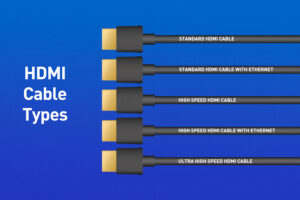
hdmi cables

Cables HDMI: Barato vs. Caro - ¿Merece la pena?

Introduction Walk into any electronics store, and you’ll see HDMI cables priced from $5 to $150. But does splurging on a “premium” cable guarantee better performance, or are you just paying for fancy packaging? Let’s dissect the real differences between budget and high-end HDMI cables—backed by data, not marketing fluff. Price Comparison: What You’re Paying For   Feature Cheap HDMI Cable Expensive HDMI Cable Average Price (6ft) $5–$15 $25–$100+ Connector Material Nickel or bare copper Gold-plated + reinforced Shielding Basic plastic/PVC Braided nylon + EMI shielding Certifications Rarely labeled HDMI 2.1, Ultra High Speed Warranty 6–12 months Lifetime/10-year warranty   Key Takeaway: Price gaps often

Leer más >>

SOLICITE UN PRESUPUESTO GRATUITO

póngase en contacto con nosotros para obtener el último catálogo de productos