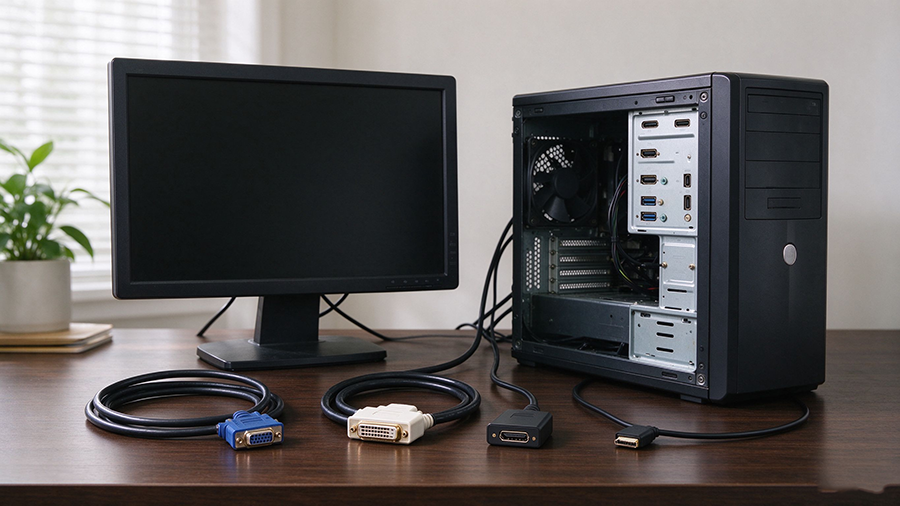
Old PCs, Monitors and Projectors Are Still Everywhere
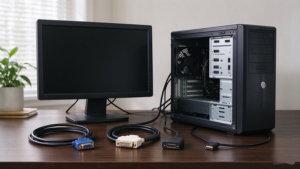
Even in 2025, you don’t have to look far to find legacy hardware: a 10-year-old office PC, a classroom projector, a retro gaming monitor, a business presentation display, or a workshop CNC / medical machine running on VGA or DVI. Meanwhile, every new TV, monitor, laptop and graphics card ships with HDMI (or USB-C).
The result is a classic compatibility problem:
- Your old PC only has VGA but your new TV only has HDMI.
- Your new graphics card has HDMI but your legacy monitor only accepts DVI or VGA.
- Your projector still has a VGA port but your laptop no longer has one.
This guide explains VGA vs DVI vs HDMI, what each port actually does, which adapter or converter you need for each direction, and how to fix the most common “no signal” problems.
The Three Interfaces: VGA, DVI and HDMI
VGA (D-Sub 15-pin, analog)
VGA (Video Graphics Array) is the oldest still-widespread interface, introduced in 1987. It uses a blue 15-pin D-Sub connector and carries an analog RGB signal.
- Signal type: Analog
- Max resolution: 1920×1080 (1080p) at 60Hz in practice; higher resolutions blur due to analog noise
- Audio: None — VGA carries video only
- Connector: Blue 15-pin D-Sub, screws on both sides
- Found on: Old PCs, office monitors, projectors, industrial equipment, retro consoles
- Quality: Susceptible to interference, ghosting, blurry text at high resolution
DVI (Digital Visual Interface)
DVI (1999) sits between VGA and HDMI. It carries a digital signal, with variants:
- DVI-D: Digital only (most common on modern legacy monitors)
- DVI-A: Analog only
- DVI-I: Both digital and analog (dual-link)
- Signal type: Digital (DVI-D) / mixed (DVI-I)
- Max resolution: Single-link 1920×1200; Dual-link 2560×1600
- Audio: None — DVI carries video only
- Connector: White large connector, flat with a row of pins
- Found on: Older graphics cards, 2005–2015 monitors, some projectors
HDMI (High-Definition Multimedia Interface)
HDMI (2002) is the current universal standard, carrying digital video + digital audio over one cable.
- Signal type: Digital
- Max resolution: HDMI 2.1 up to 4K@120Hz / 8K@60Hz
- Audio: Yes — multichannel audio, Dolby Atmos, DTS:X
- Connector: Small reversible-ish Type A plug
- Found on: New TVs, monitors, laptops, consoles, graphics cards, soundbars
VGA vs DVI vs HDMI: Full Comparison
|
Feature
|
|||
|
Signal type
|
Analog
|
Digital (DVI-D) / mixed (DVI-I)
|
Digital
|
|
Max resolution
|
1080p (practical)
|
1080p single-link / 1440p dual-link
|
4K@120Hz / 8K@60Hz (2.1)
|
|
Audio
|
❌ None
|
❌ None
|
✅ Yes (multichannel)
|
|
Connector color
|
Blue
|
White
|
Black
|
|
Typical era
|
1987–2010
|
1999–2015
|
2002–present
|
|
Cable quality
|
Analog noise, ghosting possible
|
Clean digital image
|
Clean digital + audio
|
|
HDCP / DRM
|
No
|
Limited
|
Yes
|
|
Common today
|
Old PCs, projectors, industrial
|
Legacy monitors, old GPUs
|
All modern displays
|
Which Adapter Do You Need? By Connection Scenario
|
Your Setup
|
Direction
|
Solution
|
Notes
|
|
Old PC (VGA out) → New TV/Monitor (HDMI in)
|
Analog → Digital
|
Powered VGA to HDMI converter
|
Needs a chip; often adds 3.5mm audio input
|
|
New PC (HDMI out) → Old Monitor (VGA in)
|
Digital → Analog
|
Powered HDMI to VGA converter
|
Needs a chip; carry separate audio if needed
|
|
New GPU (HDMI out) → Old Monitor (DVI in)
|
Digital → Digital
|
Passive HDMI to DVI-D adapter
|
Cheap, no power, video only
|
|
Old PC (DVI out) → New TV (HDMI in)
|
Digital → Digital
|
Passive DVI-D to HDMI adapter/cable
|
No audio over DVI; use separate audio cable
|
|
Old Projector (VGA in) → Modern Laptop (USB-C/HDMI)
|
Digital → Analog
|
HDMI/USB-C to VGA converter
|
Powered chip required
|
|
Retro PC (VGA) → Capture card / streaming
|
Analog → Digital
|
VGA to HDMI converter with scaler
|
Some capture cards need HDMI input
|
|
Dual-link DVI monitor (2560×1600)
|
Digital → Digital
|
Dual-link DVI to HDMI cable
|
Check dual-link support; HDMI 1.4+
|
FAQ
Q: How do I connect an old VGA PC to a new HDMI TV?
Use a powered VGA to HDMI converter: connect VGA from the PC to the converter, add a 3.5mm audio cable for sound, then run HDMI from the converter to the TV. A passive adapter will not work because VGA is analog and HDMI is digital.
Q: Is DVI to HDMI the same as HDMI to DVI?
For video, yes — DVI-D and HDMI share the same digital signal, so a passive adapter or cable works in either direction. Audio does not pass through DVI, so connect speakers separately.
Q: Can I connect a new HDMI laptop to an old VGA monitor?
Yes, with a powered HDMI to VGA converter. Make sure the converter supports your monitor’s native resolution, and use a separate audio cable for sound.
Q: Does VGA support 1080p?
VGA can output 1080p at 60Hz, but the analog signal often looks blurry or ghosted. For a sharp 1080p image, DVI or HDMI is strongly preferred.
Q: Why is there no sound after DVI to HDMI?
Because DVI carries video only. Run a separate 3.5mm audio cable, optical TOSLINK, or use HDMI from a different port for audio.
Q: Which is better: VGA, DVI or HDMI?
For new equipment, HDMI wins (digital video + audio, 4K/8K). DVI is a legacy digital option for old monitors; VGA is the last resort for analog-only devices. Keep legacy hardware alive with the right converter.