2026 USB4.0 Cable Guide: Certification, Power & Length
Release Date:01/08/2026
Оглавление
By 2026, USB4.0 cables have become the universal backbone for high-speed data, charging, and video—but not all cables are created equal. With counterfeit “certified” lines flooding the market and new 240W EPR and 80Gbps options, picking the right cable means focusing on four non-negotiable metrics: USB-IF certification, 240W power delivery, 40Gbps (or 80Gbps) speeds, and cable length limits.
1. USB-IF Certification: The Only Way to Guarantee Performance
In 2026, counterfeit USB4 cables now mimic official labeling better than ever. USB-IF certification is your only protection against underperforming lines that risk damaging devices. Here’s what to look for:
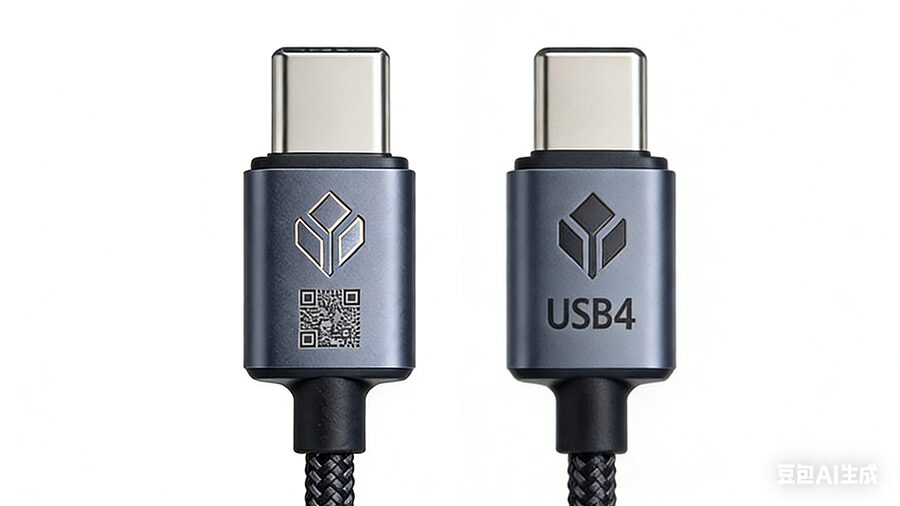
Official Labeling: Certified cables feature a laser-etched USB-IF logo, scannable QR code (links to USB-IF’s certification database), and clear text like “USB4 40Gbps 240W EPR”.
Avoid Red Flags: Skip cables labeled “USB4-compatible” or with printed (not etched) logos—90% of these fail USB-IF’s speed and safety tests in 2026 lab reports.
2. 240W EPR Power Delivery: Standard for High-Demand 2026 Devices
240W Extended Power Range (EPR) is no longer a luxury—it’s a necessity for 2026’s power-hungry gear. Here’s the breakdown:
240W Capable: USB4 Gen 3×2 cables support 240W, enough to charge 18-inch gaming laptops (240W), multi-device docks, and even some portable power tools at full speed.
100W Limitation: Older USB4 Gen 2×2 cables only deliver 100W, which is insufficient for top-tier 2026 laptops.
Обратная совместимость: A 240W USB4 cable will safely charge low-power devices (iPhones, tablets) by only delivering the required voltage.
Тип устройства
Power Draw
Recommended USB4 Cable
18-inch Gaming Laptop
240W
240W EPR USB4 Gen 3×2
16-inch MacBook Pro
140W
240W EPR USB4 Gen 3×2
iPad Pro 13-inch
35W
Any certified USB4
Multi-Device Charging Dock
180W
240W EPR USB4 Gen 3×2
3. 40Gbps (and 80Gbps) Speeds: Match to Your 2026 Workflow
40Gbps is the mainstream USB4 speed in 2026, while 80Gbps caters to extreme power users:
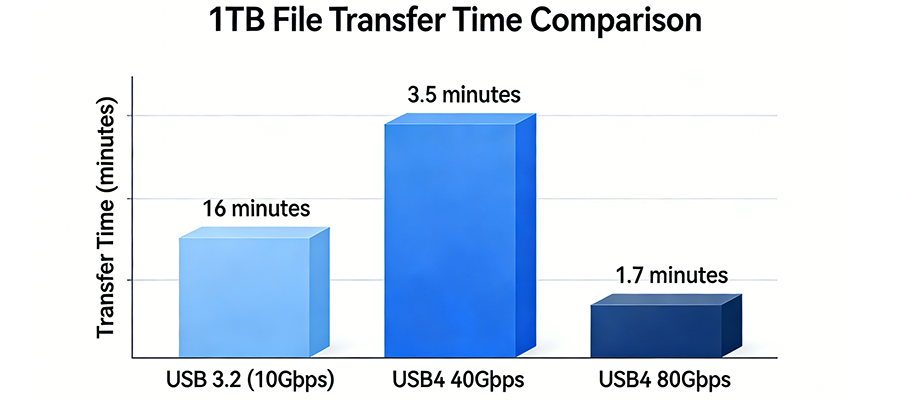
Transfer a 1TB SSD in ~3.5 minutes (5GB/s real-world speed)
Stream 4K 60Hz video to external monitors
80Gbps (USB4 Gen 4×2): Only needed for:
8K 120Hz video output
PCIe 4.0 external GPU setups
2TB SSD transfers in ~1.7 minutes
4. Passive vs. Active Cables: 2026 Length Limits
2026’s improved cable technology has extended maximum lengths, but passive and active cables still serve distinct use cases:
Passive Copper Cables: No signal boosters, best for short setups (<1m for 40Gbps, <0.5m for 80Gbps). Cheaper, more flexible, and free of EMI interference.
Active Copper Cables: Built-in signal repeaters, ideal for mid-range lengths (<5m for 40Gbps, <2m for 80Gbps). Good for home office setups (laptop to desk monitor).
Fiber Optic Cables: Light-based transmission, supports lengths up to 20m+ for 40Gbps and 10m+ for 80Gbps. Perfect for conference rooms or studio setups where copper cables cause interference.
A: Thunderbolt 4 still has stricter video/PCIe specs, but USB4 supports 240W power delivery (Thunderbolt 4 tops out at 100W until Thunderbolt 5 becomes widely available in late 2026).
Q: Do I need 80Gbps?
A: Only if you’re using 8K 120Hz displays or PCIe 4.0 external GPUs. 40 Гбит/с covers 90% of 2026 user needs.
Final Takeaway for 2026
USB4 cables are the most versatile charging and data solution of 2026, but only certified cables deliver on their promises. Prioritize USB-IF certification, 240W EPR, and match speed/length to your workflow—this will ensure you get the most value out of your cable for years to come.