If you’ve been shopping for a new TV, gaming console, or AV receiver lately, you’ve probably seen the term HDMI 2.1 pop up everywhere. But what does it actually mean? And do you really need to replace all your old cables?
The short answer: HDMI 2.1 is the biggest leap in cable technology in years — and if you want to get the most out of modern 8K TVs, next-gen gaming consoles, and immersive sound systems, your cables matter more than ever.
Let’s break it all down.
What Is HDMI 2.1?
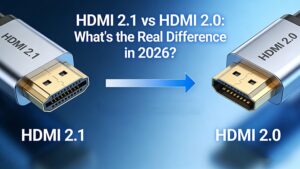
HDMI 2.1 is the latest major version of the High-Definition Multimedia Interface (HDMI) standard. It was officially released in 2017 and has since become the gold standard for connecting TVs, monitors, gaming consoles, soundbars, and home theater equipment.
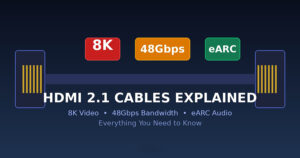
The key upgrade? A massive jump in bandwidth — from 18Gbps (HDMI 2.0) to 48Gbps. This opens the door to resolutions and features that were simply impossible before.
8K Video: Beyond Ultra HD
The most headline-grabbing feature of HDMI 2.1 is 8K resolution support.
What does 8K actually mean?
8K delivers 7680 × 4320 pixels — that’s 4 times the pixels of 4K and 16 times the pixels of 1080p. The result? Stunning clarity, even on very large screens. Text looks sharp, landscapes look lifelike, and you can sit closer to a big screen without seeing individual pixels.
But here’s what many people don’t realize: you don’t need an 8K TV to benefit from HDMI 2.1 cables. Even if you have a 4K TV, an HDMI 2.1 cable ensures you’re future-proofed for the next generation of devices and displays.
4K at 120Hz — A Huge Win for Gamers
If you’re a gamer, here’s where HDMI 2.1 really shines. The increased bandwidth allows for 4K at 120 frames per second (fps) — double the 60fps limit of HDMI 2.0. Combined with features like VRR (Variable Refresh Rate) and ALLM (Auto Low Latency Mode), HDMI 2.1 transforms your living room into a legitimate high-performance gaming display.
48Gbps: The Bandwidth That Makes It All Possible
Think of bandwidth like a highway. The wider the highway, the more data can travel through it at once.
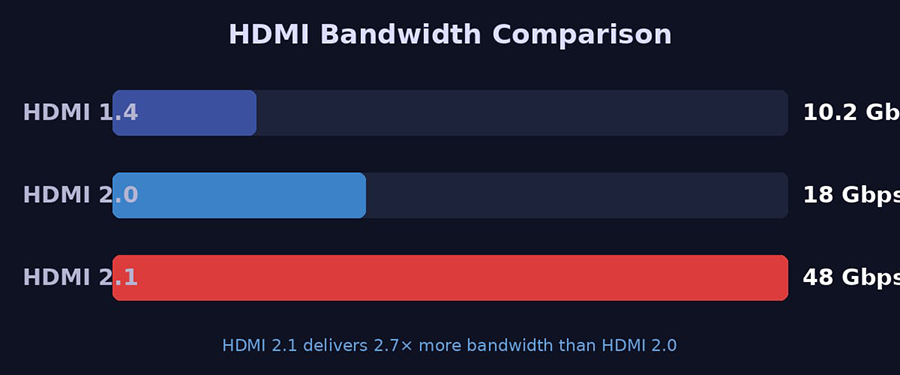
- HDMI 1.4 → 10.2 Gbps → 4K @ 30Hz
- HDMI 2.0 → 18 Gbps → 4K @ 60Hz
- HDMI 2.1 → 48 Gbps → 8K @ 60Hz / 4K @ 120Hz
With 48Gbps, HDMI 2.1 can handle:
- 8K @ 60Hz (full, uncompressed)
- 4K @ 120Hz (ideal for gaming)
- 10K resolutions (for commercial and professional displays)
- Higher color depths — up to 16-bit color (vs. 8-bit on older standards)
- Deeper color spaces including BT.2020 and Dolby Vision in full
All of this requires a properly certified cable. Not all HDMI 2.1 cables are created equal — always look for certified HDMI 2.1 cables from reputable manufacturers to ensure you’re getting true 48Gbps performance.
eARC: The Audio Upgrade You’ve Been Waiting For
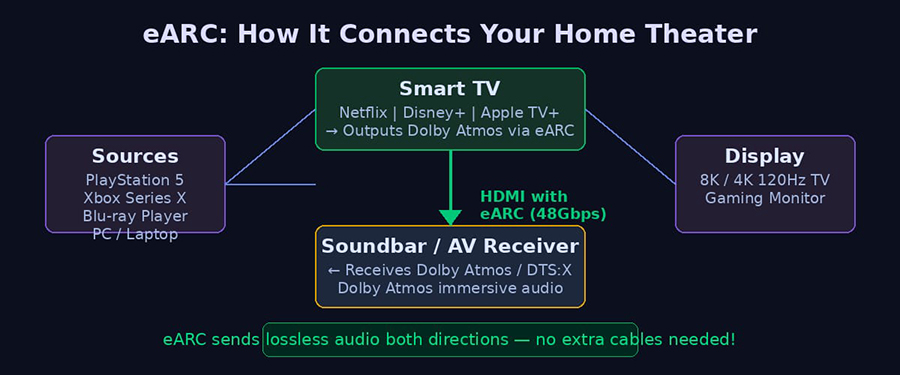
eARC (Enhanced Audio Return Channel) is one of the most exciting features of HDMI 2.1, and it’s often overlooked.
What is eARC?
Traditional ARC (Audio Return Channel) allowed your TV to send audio back to a soundbar or AV receiver using a standard HDMI cable — eliminating the need for a separate optical audio cable. It worked, but it was limited to compressed formats.
eARC supercharges this connection, allowing lossless, uncompressed audio formats to travel both directions, including:
- Dolby Atmos (object-based immersive surround sound)
- DTS:X (the competitor to Dolby Atmos)
- Dolby TrueHD and DTS-HD Master Audio (lossless movie soundtracks)
- LPCM 7.1 (uncompressed multi-channel audio)
Why does this matter?
If you’ve invested in a premium soundbar or AV receiver with Dolby Atmos support, eARC is what finally lets you hear the full, uncompressed audio experience your system is capable of. Streaming apps on your smart TV (like Netflix, Disney+, and Apple TV+) output Dolby Atmos — but with an old cable and no eARC, you’re missing out.
Pro tip: eARC requires an HDMI 2.1 cable at both ends of the connection. If you’re using an older cable between your TV and soundbar, you may not get the full audio experience even if your devices support eARC.
Other Key HDMI 2.1 Features You Should Know
VRR — Variable Refresh Rate
Eliminates screen tearing and reduces stuttering by synchronizing your display’s refresh rate with your console or PC’s frame rate. A must-have for gamers.
ALLM — Auto Low Latency Mode
Automatically switches your TV to its lowest-latency “Game Mode” when it detects a gaming signal. No more hunting through menus.
QFT — Quick Frame Transport
Reduces latency for smoother, more responsive gameplay — especially important in fast-paced competitive games.
QMS — Quick Media Switching
Eliminates the brief black screen delay that used to happen when switching between content sources or frame rates.
DSC — Display Stream Compression
A visually lossless compression standard that allows even higher resolutions and refresh rates than 48Gbps would normally allow, ensuring backward compatibility while maximizing capability.
Do I Need to Replace My Cables?
This is one of the most common questions we get:
If you have an HDMI 2.0 cable and you’re using it for:
- A 4K TV at 60Hz
- Standard movie watching
- Most TV apps and streaming
…your current cable will probably work just fine. HDMI is backward compatible, so old cables work in new ports.
You should upgrade to HDMI 2.1 certified cables if:
- You have an 8K TV or plan to buy one
- You’re using a PlayStation 5, Xbox Series X, or a high-end PC graphics card
- You want 4K at 120Hz gaming
- You have a soundbar or AV receiver with eARC and want Dolby Atmos
- You want the best possible picture and sound quality
A note on “HDMI 2.1 cables” vs “Ultra High Speed HDMI cables”
The HDMI Forum officially moved away from labeling cables by version numbers. Instead, look for cables labeled as Ultra High Speed HDMI (mandatory certification for HDMI 2.1) or 48Gbps certified. These cables are tested to handle the full HDMI 2.1 feature set. Always buy from trusted sources — counterfeit cables claiming “HDMI 2.1” are unfortunately common.
Why Quality Cables Still Matter
You could have the most expensive TV and the latest gaming console — but if your cable is poorly made, you’ll see:
- Flickering screens
- Random signal dropouts
- Black screens at higher resolutions or refresh rates
- Intermittent audio loss (especially problematic with eARC)
At FOYELEC, every HDMI 2.1 cable is individually tested to ensure it meets the full 48Gbps specification. We know that in commercial AV installations, retail displays, and home theater setups, reliability isn’t optional — it’s essential.
The Bottom Line
HDMI 2.1 isn’t just a marketing buzzword — it’s a genuine step forward that unlocks:
- ✅ 8K video for the latest displays
- ✅ 4K at 120Hz for next-gen gaming
- ✅ eARC for lossless Dolby Atmos and DTS:X audio
- ✅ VRR & ALLM for smoother, more responsive gaming
- ✅ Future-proofing for years to come
Whether you’re a home theater enthusiast, a gamer, or a business outfitting meeting rooms and retail displays, investing in certified HDMI 2.1 (Ultra High Speed) cables is one of the smartest upgrades you can make.