USB4 vs Thunderbolt 5 Cable: The Ultimate Guide to 80Gbps USB-C Connectivity
If you’ve shopped for a USB-C cable recently, you’ve likely encountered a confusing alphabet soup of standards: USB 3.2, USB4, Thunderbolt 3, Thunderbolt 4, and now Thunderbolt 5. What do all these terms mean? Which cable do you actually need? And is a USB4 cable the same as a Thunderbolt 5 cable?
In this comprehensive guide, we break down the USB4 vs Thunderbolt 5 debate in plain English. You’ll learn how an 80Gbps USB-C cable works, why bandwidth matters, and how to choose the best USB4 full-featured cable oder Thunderbolt 5 certified cable for your specific needs. Whether you’re a content creator, gamer, or IT professional, this guide will help you cut through the marketing noise and make an informed decision.
What Is a USB4 Cable?
USB4 (officially USB 4) is the latest generation of the USB standard, developed by the USB Implementers Forum (USB-IF). A USB4 cable uses the familiar USB-C connector but delivers dramatically higher performance than previous generations — up to 80Gbps of bidirectional bandwidth in its v2.0 iteration.
Unlike earlier USB standards, USB4 is built on the Thunderbolt protocol architecture, which means it natively supports multiple data and display protocols over a single cable. Key features of a quality USB4 cable include:
-
Up to 80Gbps bandwidth (USB4 v2.0) or 40Gbps (USB4 v1.0)
-
DisplayPort 2.1 support for 8K@60Hz and 4K@240Hz video output
-
PCIe tunneling for external GPUs, SSDs, and other high-speed peripherals
-
USB PD 3.1 power delivery up to 240W for charging laptops and devices
-
Backward compatibility with Thunderbolt 3/4, USB 3.2, USB 2.0, and DisplayPort
One important thing to understand: USB4 is a flexible standard, meaning not every USB4 cable supports every feature. Some USB4 cables are 40Gbps only, some don’t support PCIe tunneling, and others may lack full 240W power delivery. Always check the specifications carefully before purchasing a USB4 full-featured cable.
What Is a Thunderbolt 5 Cable?
Thunderbolt 5 is Intel’s latest iteration of the Thunderbolt standard, and it represents the highest tier of USB-C connectivity currently available. A Thunderbolt 5 cable is essentially a premium, fully-certified USB-C cable that guarantees a specific set of high-performance features — no compromises, no “optional” specs.
While Thunderbolt 5 uses the same USB-C physical connector as USB4, it sets a higher baseline for performance. Every Thunderbolt 5 certified cable must support:
-
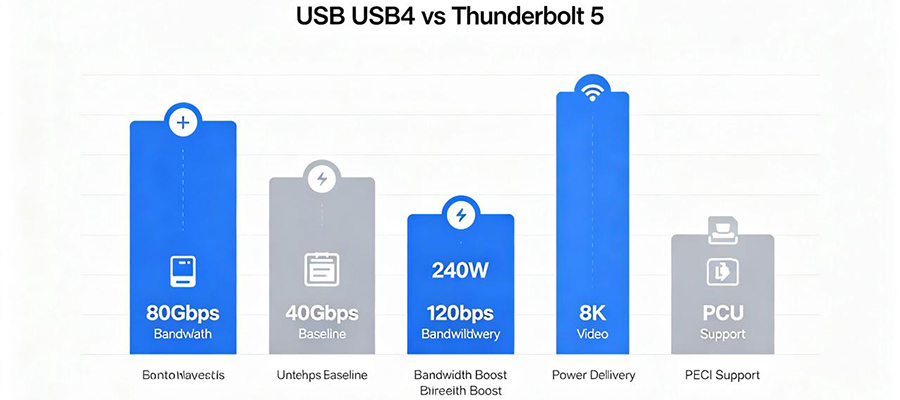
80Gbps bidirectional bandwidth as a baseline (double Thunderbolt 4’s 40Gbps)
-
120Gbps Bandwidth Boost for display-centric workloads (e.g., 8K@120Hz, dual 4K@144Hz)
-
DisplayPort 2.1 with UHBR (Ultra High Bit Rate) support
-
PCIe 4.0 x4 tunneling (up from PCIe 3.0 x4 in Thunderbolt 4)
-
USB PD 3.1 power delivery up to 240W (EPR)
-
Vollständige Abwärtskompatibilität with Thunderbolt 3/4 and all USB standards
Intel estimates that Thunderbolt 5 reached approximately 20% penetration in new laptops by mid-2025, with adoption accelerating across gaming, creator, and workstation segments. As more devices ship with Thunderbolt 5 ports, demand for a genuine Thunderbolt 5 USB-C cable is expected to surge throughout 2026 and beyond.
USB4 vs Thunderbolt 5: What’s the Difference?
The USB4 vs Thunderbolt 5 question is the most common source of confusion for shoppers. While both use the USB-C connector and share underlying technology, there are critical differences in guaranteed performance, certification, and use cases. Here’s a detailed side-by-side comparison:
|
Merkmal
|
USB4 (v2.0)
|
Thunderbolt 5
|
|---|---|---|
|
Baseline Bandwidth
|
40Gbps (v1.0) or 80Gbps (v2.0) — varies by product
|
80Gbps guaranteed on all certified cables
|
|
Bandwidth Boost
|
Not standardized (optional implementation)
|
120Gbps Bandwidth Boost for display workloads
|
|
Display-Unterstützung
|
DisplayPort 2.1 (optional; some only support DP 1.4)
|
DisplayPort 2.1 UHBR guaranteed; 8K@120Hz capable
|
|
PCIe Tunneling
|
Optional (not all USB4 cables support PCIe)
|
PCIe 4.0 x4 guaranteed for eGPU and NVMe
|
|
Stromlieferung
|
Up to 240W (varies; many are 100W only)
|
Up to 240W PD 3.1 EPR supported
|
|
Zertifizierung
|
USB-IF certification recommended but not mandatory
|
Intel Thunderbolt certification mandatory
|
|
Abwärtskompatibilität
|
USB 3.2/2.0, DP Alt Mode; TB3/TB4 if implemented
|
Full backward compat with TB3/TB4, all USB, DP
|
|
Typical Price Range
|
$15 – $50 (varies widely by features)
|
$30 – $80 (premium certified cables)
|
|
Am besten für
|
General high-speed data, budget-conscious users
|
Creators, gamers, eGPU users, professionals
|
Why 80Gbps USB-C Cables Matter in 2026
You might be wondering: do I really need an 80Gbps USB-C cable? For many users, the answer is increasingly yes. Here’s why high-bandwidth USB4 cables und Thunderbolt 5 cables are becoming essential in 2026:
-
External GPUs (eGPU) Finally Reach Their Potential
Mit PCIe 4.0 x4 tunneling over a Thunderbolt 5 cable, external GPU enclosures can now deliver near-desktop graphics performance to laptops. A Thunderbolt 5 eGPU cable provides twice the bandwidth of Thunderbolt 4, reducing bottlenecks for 3D rendering, AI training, and high-end gaming. This is a game-changer for creators who want laptop portability with desktop-class graphics power.
-
8K and High-Refresh Displays Go Mainstream
As 8K monitors and 4K@240Hz gaming displays become more affordable, the need for a cable that can carry that much video data grows. A USB4 8K cable with DisplayPort 2.1 support can drive a single 8K@60Hz display or dual 4K@144Hz monitors over a single connection. Thunderbolt 5’s 120Gbps Bandwidth Boost pushes this even further, enabling 8K@120Hz for professional video editing and immersive gaming.
-
Blazing-Fast External Storage
NVMe SSDs in Thunderbolt 5 enclosures can now reach read/write speeds exceeding 6,000 MB/s — fast enough to edit 8K RAW video directly from an external drive. A quality USB4 cable for external SSD ensures you’re not bottlenecking your expensive storage. For professionals working with large video files, 3D assets, or massive datasets, an 80Gbps USB-C cable is no longer a luxury — it’s a productivity necessity.
-
Single-Cable Docking Stations
The dream of a single-cable desktop setup is finally fully realized with USB4 and Thunderbolt 5. One USB4 cable for docking station can simultaneously charge your laptop (up to 240W), drive dual 4K or 8K displays, connect to gigabit Ethernet, and run multiple USB peripherals — all at full speed. This eliminates cable clutter and makes switching between work and personal devices effortless.
-
Future-Proofing Your Investment
Even if your current devices only support 40Gbps (Thunderbolt 4 / USB4 v1.0), investing in an 80Gbps USB4 cable oder Thunderbolt 5 cable ensures you’re ready for your next laptop, monitor, or peripheral. As Thunderbolt 5 adoption grows (Intel projects rapid expansion through 2026–2027), an 80Gbps cable will remain useful for years — unlike a 10Gbps USB 3.2 cable that may become obsolete when you upgrade.
Key Features of a Quality USB4 / Thunderbolt 5 Cable
When shopping for the best USB4 cable oder Thunderbolt 5 cable, these are the features that matter most:
-
Certified Bandwidth Rating: Look for explicit “USB4 80Gbps” or “Thunderbolt 5 80Gbps” certification. Avoid cables that only say “USB-C” or “high-speed” without a specific Gbps rating — they may only support 10Gbps or 480Mbps.
-
Active vs. Passive Design: Passive cables work up to 1m for 80Gbps. For longer lengths (1.5m+), an active USB4 cable with a retimer chip is required to maintain signal integrity at full speed.
-
E-Marker Chip: All high-power, high-speed USB-C cables should include an E-Marker chip that authenticates the cable’s capabilities (bandwidth, power, video support) to connected devices.
-
DisplayPort 2.1 Support: For 8K@60Hz or higher, confirm the cable supports DisplayPort 2.1 with UHBR (Ultra High Bit Rate). DP 1.4 cables are limited to 8K@30Hz or 4K@120Hz.
-
PCIe Tunneling Support: Essential for eGPU enclosures and NVMe SSD docks. Thunderbolt 5 guarantees PCIe 4.0 x4; USB4 cables may or may not support PCIe — check carefully.
-
Power Delivery Rating: Suche nach USB4 PD 240W support if you want to charge high-wattage gaming laptops or workstations. Many USB4 cables are limited to 100W.
-
Langlebige Konstruktion: Braided nylon or aramid fiber jackets, aluminum connector shells, and reinforced strain relief (10,000+ bend rating) ensure your investment lasts.
-
Length Consideration: 80Gbps signals degrade over distance. For 0.5–1m, passive cables work fine. For 1.5–2m, choose an active cable with a retimer. For 2m+, consider a fiber optic USB4 cable.
Who Needs a USB4 or Thunderbolt 5 Cable?
While a USB4 cable oder Thunderbolt 5 cable works with any USB-C device (it automatically negotiates the highest mutually supported speed), it’s especially valuable for these users:
|
User Type
|
Why They Need USB4 / Thunderbolt 5
|
Recommended Cable
|
|---|---|---|
|
Content Creators
|
Edit 8K RAW video from external NVMe SSDs; drive 8K reference monitors; transfer massive project files at 80Gbps
|
Thunderbolt 5 cable (80Gbps, DP 2.1, PCIe 4.0)
|
|
Gamer
|
Connect eGPU enclosures for desktop-class graphics; drive 4K@240Hz or 8K@60Hz gaming displays; reduce input latency
|
Thunderbolt 5 cable (120Gbps Boost, PCIe 4.0 x4)
|
|
MacBook / Ultrabook Users
|
Single-cable docking station setup; charge laptop + dual displays + peripherals over one cable; fast external SSD backups
|
USB4 full-featured cable (40Gbps or 80Gbps, 100W+ PD)
|
|
IT / Office Managers
|
Standardize on one high-performance cable type for docking stations, monitors, and device charging across the office
|
USB4 cable (certified, 40Gbps+, bulk-packaged)
|
|
AI / ML Developers
|
Connect external GPU enclosures for model training; transfer large datasets at maximum speed; drive multiple high-resolution displays
|
Thunderbolt 5 cable (80Gbps, PCIe 4.0, 240W PD)
|
|
Photographers
|
Import gigabytes of RAW photos from card readers and SSDs in seconds; tether to 8K monitors for color-accurate editing
|
USB4 cable (40Gbps+, DP 1.4 or 2.1)
|
USB4 / Thunderbolt 5 Cable vs. Standard USB-C Cable
How does a high-performance USB4 cable compare to the standard USB-C cable that came with your phone or laptop? Here’s the breakdown:
|
Aspekt
|
Standard USB-C Cable (USB 2.0 / 3.2)
|
USB4 / Thunderbolt 5 Cable
|
|---|---|---|
|
Data Speed
|
480Mbps (USB 2.0) to 10Gbps (USB 3.2 Gen 2)
|
40Gbps to 80Gbps (up to 8x faster)
|
|
Video-Ausgang
|
Often none (charge-only); DP Alt Mode if supported (4K@60Hz max)
|
DisplayPort 2.1; 8K@60–120Hz, dual 4K@144Hz
|
|
PCIe Support
|
Keine
|
PCIe 3.0/4.0 x4 for eGPU and NVMe
|
|
Stromlieferung
|
Typically 60–100W; some only 18W
|
Up to 240W PD 3.1 EPR
|
|
Docking Station
|
Limited; may not support full-featured docks
|
Full single-cable docking (power + displays + data + Ethernet)
|
|
Preis
|
$5 – $20
|
$20 – $80 (varies by speed and length)
|
|
Am besten für
|
Phone charging, basic data sync, travel backup
|
Pro workstations, eGPU, 8K displays, docking stations
|
FAQ
Q: Is a Thunderbolt 5 cable the same as a USB4 cable?
No, but they’re closely related. A Thunderbolt 5 cable is a premium, fully-certified USB-C cable that guarantees 80Gbps, PCIe 4.0, DisplayPort 2.1, and 240W power delivery. A USB4 cable may support some or all of these features, but the standard allows for optional implementations — so performance varies by product. A Thunderbolt 5 cable will always work as a USB4 cable, but not every USB4 cable meets Thunderbolt 5 standards.
Q: Can I use a Thunderbolt 5 cable with a USB4 port?
Yes. A Thunderbolt 5 USB-C cable is fully backward compatible with USB4, Thunderbolt 4/3, USB 3.2, and USB 2.0 ports. It will automatically negotiate the highest speed both the port and cable support. If your device has a 40Gbps USB4 port, the cable will run at 40Gbps — you won’t damage anything by using a higher-rated cable.
Q: Do I need a special cable for 8K video output?
Yes. For 8K@60Hz or higher, you need a cable that supports DisplayPort 2.1 with UHBR (Ultra High Bit Rate). A USB4 8K cable oder Thunderbolt 5 cable with DP 2.1 support is required. Standard USB-C cables with DP 1.4 are limited to 8K@30Hz (with DSC compression) or 4K@120Hz. Always check the DisplayPort version before buying.
Q: What does 120Gbps Bandwidth Boost mean on Thunderbolt 5?
Thunderbolt 5’s 120Gbps Bandwidth Boost is a special mode that temporarily allocates extra bandwidth to display-centric workloads. Instead of the standard 80Gbps bidirectional split, Bandwidth Boost can provide up to 120Gbps in one direction for video output — enabling resolutions like 8K@120Hz or dual 4K@144Hz that would otherwise require two cables. This feature is exclusive to Thunderbolt 5 and not available on standard USB4 cables.
Q: Can a USB4 cable charge my laptop?
Many can, but not all. A USB4 PD 240W cable supports the full USB PD 3.1 EPR standard and can charge high-wattage gaming laptops and workstations. However, some USB4 cables are data-only (no power wires) or limited to 60W/100W. Always check the cable’s power delivery rating if you need charging. For maximum compatibility, look for a full-featured USB4 cable that supports both 80Gbps data and 240W power delivery.